YellowKey: Anatomy of an Unpatched BitLocker Bypass via WinRE
Analysis of the YellowKey zero-day: how a crafted FsTx folder on a USB stick unlocks BitLocker-encrypted Windows 11 drives through the Windows Recovery Environment.
TL;DR
- A researcher published a working proof-of-concept on 2026-05-12 that bypasses BitLocker Full Volume Encryption (FVE) on Windows 11 and Windows Server 2022/2025 using only a USB drive and physical access.
- The exploit abuses a component exclusive to the Windows Recovery Environment (WinRE): placing a crafted
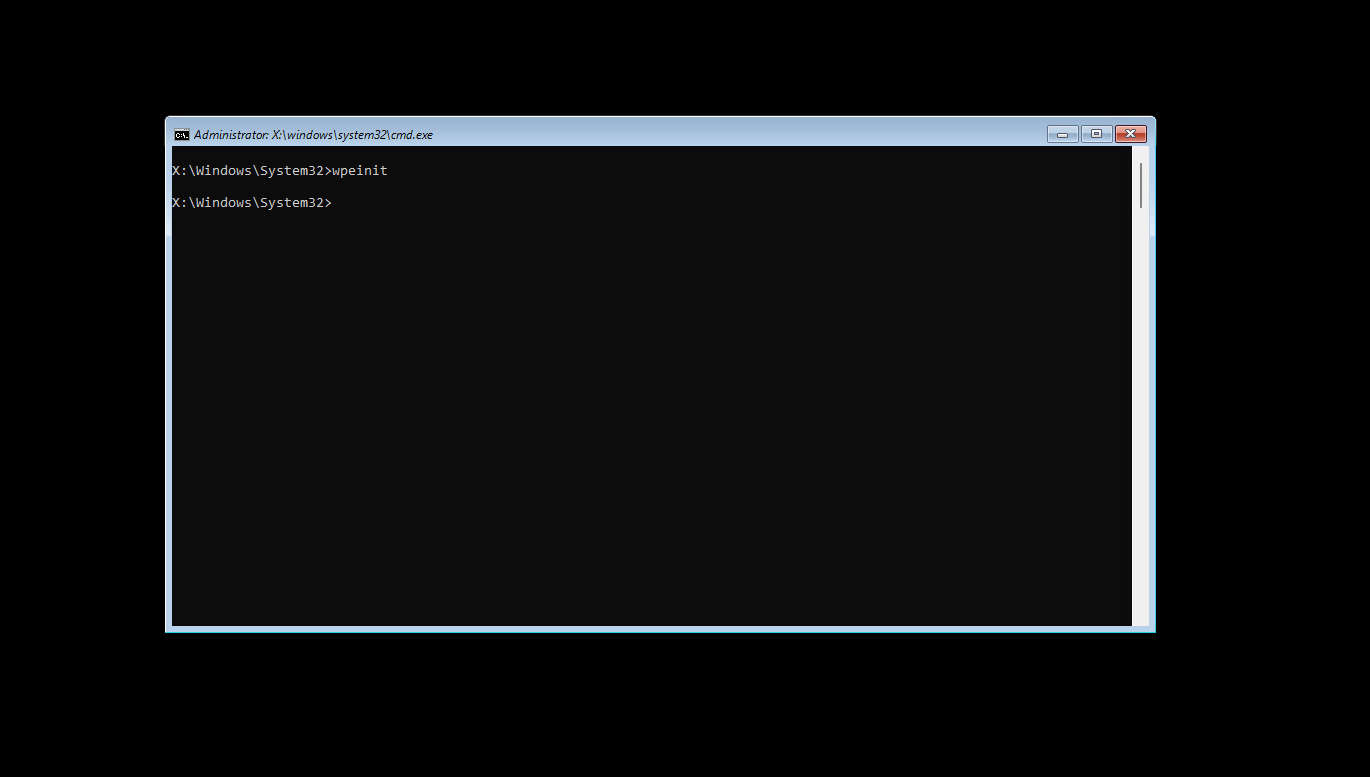
FsTxfolder underSystem Volume Informationtriggers a Transactional NTFS (TxF) log replay that deleteswinpeshl.inion the WinRE volume, dropping acmd.exeshell with the protected volume already unlocked by the TPM.- The public PoC works against the default TPM-only BitLocker configuration. Microsoft has not issued a patch or CVE as of this post’s publication date (2026-05-19).
- Immediate mitigation: enable BitLocker pre-boot PIN (
TPM+PIN) and set a UEFI/BIOS boot password; disable USB boot in firmware. See Mitigations.- A KQL hunting query and a Sigma detection rule ship with this post for use in Microsoft Defender for Endpoint / Sentinel environments.
Background
On 2026-05-12, the researcher operating under the aliases Nightmare-Eclipse and Chaotic Eclipse published a GitHub repository named YellowKey containing a working proof-of-concept (PoC) BitLocker bypass. The researcher has previously disclosed multiple Microsoft vulnerabilities under the names BlueHammer (CVE-2026-33825), RedSun (no identifier assigned), and UnDefend — all in Microsoft Defender. Both BlueHammer and RedSun were exploited in the wild shortly after public disclosure.
YellowKey is the researcher’s most significant disclosure to date. Independent confirmation came within 24 hours from Will Dormann (Principal Vulnerability Analyst, Tharros Labs) and Kevin Beaumont. Both verified the PoC on their own hardware.12
Disclosure context. The researcher has stated publicly that these disclosures are motivated by dissatisfaction with Microsoft’s Security Response Center (MSRC) handling of previous reports — including silent fixes with no CVE credit. Microsoft’s response when contacted was a generic commitment to investigate. No CVE has been assigned and no patch has been released as of 2026-05-19.
Affected Systems
| Platform | Affected | Notes |
|---|---|---|
| Windows 11 (all editions) | Yes | Default TPM-only BitLocker configuration |
| Windows Server 2022 | Yes | Confirmed in researcher README |
| Windows Server 2025 | Yes | Confirmed in researcher README |
| Windows 10 (all editions) | No | WinRE ships without the vulnerable FsTx-processing component |
The Windows 10 exemption appears structural: the same component exists in a Windows 10 WinRE image but without the FsTx-processing functionality. The researcher offers no confirmed technical explanation; the “intentional backdoor” framing is their interpretation, not a verified claim. Treat it as an open hypothesis.
Technical Mechanism
Attack Prerequisites
- Physical access to the target machine (duration of a single reboot).
- A USB drive formatted as NTFS, FAT32, or exFAT.
- The
FsTxfolder from the YellowKey repository. - Target running Windows 11 or Server 2022/2025 with BitLocker in TPM-only mode (the Windows 11 default for consumer and most OEM business configurations).
No recovery key, no account credentials, and no prior software access are required.
Exploit Chain
| Step | Actor | Action | Notes |
|---|---|---|---|
| 1 | Attacker | Copy FsTx/ to USB:\System Volume Information\FsTx | NTFS, FAT32, or exFAT USB; payload from YellowKey repo |
| 2 | Attacker | Boot into WinRE via Shift+Restart → hold CTRL | Timing-sensitive; may require multiple attempts |
| 3 | WinRE (X:\) | Mount all attached volumes including USB | Normal WinRE boot behavior |
| 4 | WinRE (X:\) | TxF log replay triggered by FsTx on USB | Cross-volume write primitive; root cause per Dormann |
| 5 | WinRE (X:\) | winpeshl.ini deleted from X:\ | WinRE recovery UI launch file removed |
| 6 | WinRE (X:\) | cmd.exe shell spawned (fallback; winpeshl.ini absent) | Shell runs in WinRE context with TPM-released VMK |
| 7 | BitLocker Volume (C:\) | Volume readable — VMK already released by TPM at boot | No PIN or recovery key required in TPM-only mode |
| 8 | Attacker | diskpart, file copy, or drive imager | Full read access to previously encrypted volume |
What Actually Happens — Will Dormann’s Observation
Will Dormann’s independent reproduction provides the clearest public description of the root cause mechanism:
“It looks like Transactional NTFS bits on a USB Drive are able to delete the
winpeshl.inifile on another drive (X:). And we get acmd.exeprompt, with BitLocker unlocked instead of the expected Windows Recovery environment.”1
The WinRE boot process normally loads winpeshl.ini to launch the recovery shell UI (reagentc). When TxF log replay — triggered by the attacker’s FsTx folder on the USB volume — deletes that file from the WinRE system drive (X:), Windows falls back to a raw cmd.exe. At that point, the TPM has already released the BitLocker Volume Master Key (VMK) as part of normal boot, so the volume appears decrypted.
Dormann also noted the deeper implication: a System Volume Information\FsTx directory on one volume is able to modify the contents of a separate, different volume during WinRE log replay. This cross-volume write primitive is the unexpectedly surprising behavior.
EFI Partition Variant
The researcher notes the USB drive is not strictly required. An attacker who can briefly remove the target drive (e.g., a stolen laptop) can write the FsTx folder to the EFI System Partition (ESP) and return the drive. Note that Dormann was not able to reproduce the EFI partition variant in his testing; the USB path is the confirmed, reproducible vector.
ATT&CK Mapping
| Tactic | Technique | Description |
|---|---|---|
| Initial Access | T1200 — Hardware Additions | USB drive used to deliver the FsTx payload |
| Defense Evasion | T1542 — Pre-OS Boot | Abuse of WinRE, a pre-OS recovery environment, to bypass OS-level controls |
| Collection | T1006 — Direct Volume Access | Shell access to the BitLocker volume without OS mediation |
| Credential Access | T1555 — Credentials from Password Stores | Post-bypass access to credential stores (LSASS dump, SAM, DPAPI blobs) |
Mitigations
These are listed in descending order of effectiveness against the confirmed public PoC.
1. Enable BitLocker Pre-Boot PIN (TPM+PIN)
This is the highest-priority control. The public PoC requires the TPM to auto-release the VMK at WinRE boot. A pre-boot PIN prevents automatic VMK release without manual entry.
1
2
3
4
5
# Check current BitLocker protectors on C:
manage-bde -protectors -get C:

# Add a PIN protector (requires existing TPM protector)
manage-bde -protectors -add C: -TPMAndPIN
The researcher claims a non-public variant of YellowKey works against TPM+PIN. This has not been independently reproduced as of 2026-05-19. Independent testing (GitHub issue #2 in the YellowKey repo) terminates at the PIN prompt. Treat TPM+PIN as a strong mitigation, not an immunity, until Microsoft issues an official scoped patch.
2. Set a UEFI/BIOS Boot Password and Disable USB Boot
Kevin Beaumont’s recommendation: if the firmware will not boot from USB without a password, the attacker cannot load the crafted USB volume into WinRE at all. This is a clean pre-condition block.
- Enter UEFI setup → set an Administrator password.
- Disable USB boot, or set boot order to internal disk only.
3. Consider Disabling or Hardening WinRE
On managed endpoints where WinRE is not operationally necessary:
1
2
3
4
5
# Disable WinRE entirely (prevents legitimate recovery use — evaluate trade-off)
reagentc /disable

# Verify state
reagentc /info
Disabling WinRE removes a legitimate recovery path. Evaluate against your operational requirements. This is a last-resort measure for high-security endpoints.
4. Apply Principle of Physical Security
YellowKey has a hard prerequisite: the attacker must be able to reboot the machine. Standard physical security controls (screen lock, unattended device policy, unattended workstation policy) do not prevent this — but they do raise the barrier.
Detection Engineering
The fundamental detection challenge with YellowKey is that the attack occurs inside WinRE, where standard endpoint agents (Microsoft Defender for Endpoint, third-party EDR) are not running against the main OS. Detection therefore focuses on two windows:
- Pre-attack: USB insertion correlated with a subsequent WinRE session.
- Post-attack: Forensic indicators on the OS after return to normal boot — anomalous BitLocker state changes, unexpected volume access, or deletion of
winpeshl.ini.
KQL — Defender for Endpoint: USB Insertion Preceding WinRE Boot Event
// YellowKey Hunt: USB mass storage mount within 30 minutes of a WinRE/Recovery boot
// Telemetry prerequisite: MDE with Device Timeline enabled; Windows Event Forwarding
// for Security and System logs
// Table: DeviceEvents (MDE), DeviceLogonEvents
// False positives: legitimate IT recovery operations; document exceptions

let usbMounts = DeviceEvents
    | where ActionType == "UsbDriveMounted"
    | project DeviceId, DeviceName, UsbTimestamp = Timestamp,
              AdditionalFields;

let winreBoots = DeviceEvents
    | where ActionType == "OsStateChanged"
    | where AdditionalFields has_any ("WinRE", "Recovery", "winpe")
    | project DeviceId, WinreTimestamp = Timestamp, BootFields = AdditionalFields;

usbMounts
| join kind=inner winreBoots on DeviceId
| where WinreTimestamp > UsbTimestamp
| where datetime_diff('minute', WinreTimestamp, UsbTimestamp) <= 30
| project DeviceName, DeviceId, UsbTimestamp, WinreTimestamp,
          MinutesBetween = datetime_diff('minute', WinreTimestamp, UsbTimestamp),
          AdditionalFields, BootFields
| order by WinreTimestamp desc
Telemetry note.
OsStateChangedevents with WinRE context are dependent on your MDE onboarding configuration and Windows version. Validate this query returns expected results in your environment before treating absence of results as confirmed-clean.
Sigma — Suspicious FsTx Directory on Removable Media
1
2
3
4
5
6
7
8
9
10
11
12
13
14
15
16
17
18
19
20
21
22
23
24
25
26
27
28
title: YellowKey - Suspicious FsTx Directory in System Volume Information
id: a3f1c2e7-88b4-4d29-b9f0-12e3f5d67a90
status: experimental
description: >
  Detects creation of a FsTx directory within the System Volume Information
  folder on any drive. This path structure is used by the YellowKey BitLocker
  bypass PoC to deliver a crafted Transactional NTFS log payload to WinRE.
references:
  - https://github.com/Nightmare-Eclipse/YellowKey
  - https://www.bleepingcomputer.com/news/security/windows-bitlocker-zero-day-gives-access-to-protected-drives-poc-released/
author: daniel
date: 2026/05/19
tags:
  - attack.initial_access
  - attack.t1200
  - attack.defense_evasion
  - attack.t1542
logsource:
  category: file_event
  product: windows
detection:
  selection:
    TargetFilename|contains: '\System Volume Information\FsTx'
  condition: selection
falsepositives:
  - Legitimate NTFS Transactional log recovery operations by Windows itself.
    Validate that the creating process is not System (PID 4) before alerting.
level: high
Post-Exploit: BitLocker Audit Events to Monitor
Windows generates BitLocker-specific events in the Microsoft-Windows-BitLocker-API/Management log. The following Event IDs are relevant to an anomalous WinRE-based unlock:
| Event ID | Source | Meaning | Relevance to YellowKey |
|---|---|---|---|
| 24620 | BitLocker-API | Auto-unlock key stored for a volume | Baseline: should match expected drives |
| 24673 | BitLocker-API | BitLocker drive decryption started | Unexpected decryption after a WinRE session |
| 24676 | BitLocker-API | BitLocker was suspended | Suspension not initiated by an admin |
| 4688 | Security | Process creation | cmd.exe spawned in WinRE context (parent: wpeutil.exe or winpeshl.exe absent) |
Correlating a
cmd.exeprocess creation (Event ID 4688) with a missingwinpeshl.exeparent in the same session is the on-device signal that the WinRE fallback shell fired. This requires process creation auditing enabled and Event ID 4688 with command-line logging.
Limitations and Confidence Assessment
| Claim | Confidence | Basis |
|---|---|---|
| PoC bypasses BitLocker on TPM-only Windows 11 | High | Independently reproduced by Dormann, Beaumont, and multiple other researchers |
Root cause is TxF log replay deleting winpeshl.ini | Medium-High | Dormann’s reproduction description; no vendor-confirmed root cause analysis |
| EFI partition variant works | Low | Researcher claim; Dormann could not reproduce; no independent confirmation |
| TPM+PIN variant exists | Unverified | Researcher claim only; public PoC confirmed blocked by PIN; no independent reproduction |
| “Intentional backdoor” | Speculation | Researcher’s interpretation; no evidence of intent; treat as open hypothesis |
This analysis is based entirely on public reporting, the PoC repository, and independent researcher statements. I have not conducted hands-on reproduction in my lab; this post is a threat-analysis and detection-engineering response, not a technical teardown of the binary. A follow-up post will cover hands-on reproduction and WinRE binary diffing (Windows 10 vs. Windows 11 WinRE images) when time allows.
This post analyzes a zero-day with no available patch. All PoC references point to the researcher’s public repository; no exploit code is reproduced here. The detection artifacts ship with the post and are oriented exclusively toward identifying and responding to attack attempts.
IoCs
There are no network-based Indicators of Compromise (IoCs) associated with the YellowKey PoC. The attack is entirely local and physical. The relevant indicators are filesystem-based:
| Indicator | Type | Context |
|---|---|---|
\System Volume Information\FsTx\ | Directory path (removable media) | YellowKey payload staging path on USB |
winpeshl.ini absent from X:\ during WinRE | File absence | Post-exploitation: file deleted by TxF replay |
No IoC CSV is included in this post because the indicators are structural rather than hash-based, and publishing the FsTx directory contents would reproduce exploit material.
References
- Nightmare-Eclipse. YellowKey GitHub Repository. Published 2026-05-12. https://github.com/Nightmare-Eclipse/YellowKey
- BleepingComputer. Windows BitLocker Zero-Day Gives Access to Protected Drives, PoC Released. 2026-05-13. https://www.bleepingcomputer.com/news/security/windows-bitlocker-zero-day-gives-access-to-protected-drives-poc-released/
- The Hacker News. Windows Zero-Days Expose BitLocker Bypasses and CTFMON Privilege Escalation. 2026-05-14. https://thehackernews.com/2026/05/windows-zero-days-expose-bitlocker.html
- Blackfort Technology. YellowKey: Technical Analysis of a Potential BitLocker Recovery Attack. Updated 2026-05-15. https://blackfort-tec.de/en/insights/yellowkey-bitlocker-bypass-windows-11-vulnerability
- MITRE ATT&CK. T1006 — Direct Volume Access. https://attack.mitre.org/techniques/T1006/
- MITRE ATT&CK. T1542 — Pre-OS Boot. https://attack.mitre.org/techniques/T1542/
- MITRE ATT&CK. T1200 — Hardware Additions. https://attack.mitre.org/techniques/T1200/
- Microsoft Documentation. BitLocker overview and requirements FAQ. https://learn.microsoft.com/en-us/windows/security/operating-system-security/data-protection/bitlocker/faq
- Microsoft Documentation. BitLocker Group Policy reference — Configure TPM startup PIN. https://learn.microsoft.com/en-us/windows/security/operating-system-security/data-protection/bitlocker/bitlocker-group-policy-settings
Changelog
- 2026-05-19 — Initial publication. KQL and Sigma artifacts added. TPM+PIN reproduction status updated based on Blackfort Technology’s 2026-05-15 update confirming public PoC blocked at PIN prompt.
Will Dormann, Mastodon post, 2026-05-13. Cited via BleepingComputer and independent reporting. https://www.bleepingcomputer.com/news/security/windows-bitlocker-zero-day-gives-access-to-protected-drives-poc-released/ ↩︎ ↩︎2
Kevin Beaumont, confirmation and mitigation recommendation, cited via IT-Connect and BleepingComputer coverage. ↩︎